Feeds
Feed names
A feed name is 1 to 64 characters of a–z, 0–9, - and _. Anything else is rejected with 400. These names are taken by notefeed itself and are reserved: r, api, login, logout, mcp, metrics, n, _next, static, health, imprint, privacy, terms, license, plus any names in NOTEFEED_RESERVED_FEEDS (see Configuration). Posting to a reserved name answers 400, except logout: that's the web UI's log-out route, which answers with a redirect and stores nothing. A trailing slash is fine: POST /<feed>/ works like POST /<feed>.
The name is the key
Anyone who knows a feed's name can read it, post to it, edit and delete its notes, and delete the feed. Pick one that's hard to guess, like homelab-7f3k2q9x4m8wz, and share the read link instead of the name.
Feed settings in the web UI
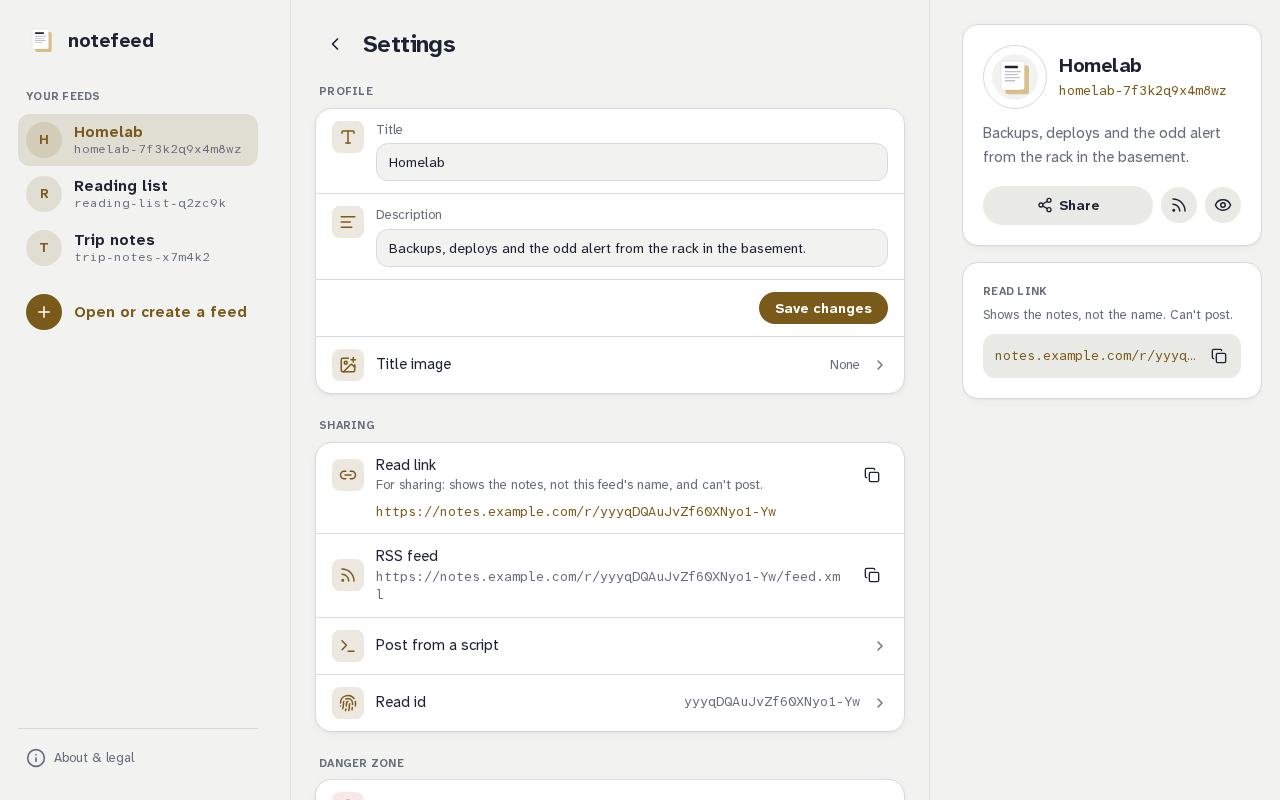
The settings button (the cog in the feed's details) opens /<feed>/settings. It exists once the feed has a note. The page is a list of rows in groups: Profile, Sharing, Privacy & access (on a protected feed you have unlocked), License (on notefeed.me) and Danger zone. A row that holds a form opens with a tap and closes again; the others show their value or a copy button.
On notefeed.me
The License row shows the feed's tier, Free tier · N of 1000 notes with a meter or the licensed state, and is where a license key is entered, moved to another feed or taken off. See Free tier and licenses.
Profile has the feed's Title and Description and a Save changes button. The title is shown as the heading of the feed's details and in the browser tab, with the description below it; the feed's name stays shown there too. Both also show in the read-only view and are the RSS feed's title and description, so anyone with the read link sees them. With sign-in on, Profile also has a Show who posted switch: off, the sender is left out of the read-only view and the RSS feed (the feed page still shows it). It is not shown when sign-in is off. Leave a field empty to clear it. The feed's name never changes.
The Title image row has a Choose image button, which posts an image as a note of its own and saves it as the feed's title image at once, the feed's existing images to pick one from, and a Remove image button. Any of them saves what is typed in the title and description too. The title image shows in the feed's details and in the read-only view, and is the RSS feed's channel image. Like the title, it is public to anyone with the read link. If its image note is deleted, the title image goes with it. Choosing and removing an image need JavaScript.
Sharing shows the feed's read link and its RSS link, each with a copy button, so you can hand them to a feed reader or a dashboard; until the feed has its first note it says so instead. Post from a script opens a curl command for this feed, with the headers it needs: Authorization on an instance with a password, and X-Feed-Password on an unlocked protected feed. Read id opens a field with the current one (where the instance lets read ids be chosen) and a Generate a random one button: see Choosing a feed's read id for what a change does.
Privacy & access only appears on a protected feed you have unlocked (see A password for a feed).
Delete this feed, in the Danger zone at the end, removes the feed with all its notes, its settings, its password and its read link, for good. You confirm by typing the feed's name, exactly, and pressing Delete feed. Afterwards you land on the start page, and the name can be used again. A new feed with that name gets a different read link, and the old link stays empty.
The settings and deleting work without JavaScript: they are plain forms that post to /<feed>/details and /<feed>/delete, and they only accept requests from the instance's own pages. (Posting, editing and deleting notes need JavaScript.) A script uses the API instead. If something is refused (a title that is too long, too many requests), the settings page says why and nothing changes. They count toward the same rate limit as posting.
Anyone who can open the feed can change its settings and delete it: on an open feed that is anyone who knows its name, and on a feed with its own password it is anyone who has unlocked it. A locked feed shows only its unlock form, without its title, description or title image. The read-only view has no settings.
Feed settings in the API
A feed can have a title (at most 100 characters) and a description (at most 500), both on one line. The title is shown as the heading of the feed's details on the feed page, with the feed's name under it, and both show in the read-only view and in the RSS feed (see RSS and dashboards). The feed's name stays as it is: you can't rename a feed. A feed has neither until you set them.
GET /api/v1/feeds/<feed> answers with the feed's name, title, description, show_sender, image_url, protected and read_url. read_url is null while the feed has no notes, and for a feed without a read link, and image_url is null while the feed has no title image (or its file was removed by hand), while the feed has no notes, and for a feed without a read link. PUT on the same URL replaces the title and the description, both at once, and answers with the feed; an empty string clears one. Surrounding spaces are trimmed, and control characters, including a line break, and text-direction override characters (U+202A to U+202E, U+2066 to U+2069) are refused.
curl -X PUT -H "Content-Type: application/json" \
  -d '{"title": "Homelab", "description": "Deploys and alerts"}' \
  https://notes.example.com/api/v1/feeds/homelab-7f3k2q9x4m8wz
show_sender (a boolean, on by default) matters only when sign-in is on: set to false in the PUT body, it leaves the sender out of the public read view, the RSS feed and the public read API. Leaving it out keeps the current value.
The feed's title image is one of the feed's pictures. Add "image": "<file>" to the body, with the file of a picture, to show it in the feed's details, the read-only view and as the RSS channel image. "image": "" removes it, and leaving image out keeps the one the feed has. A name that is not an image note of this feed is a 400, and deleting that note takes the title image away. The title image is public, like the title.
DELETE removes the feed for good and answers 204 with no body: every note, every image, the title and description, the password and the read link. There is no undo and no trash:
curl -X DELETE https://notes.example.com/api/v1/feeds/homelab-7f3k2q9x4m8wz
What to know:
- Who may: whoever may post to the feed. On an open feed the name is the key, so anyone who knows it can change its title and delete the whole feed, not only add notes. A feed with its own password needs
X-Feed-Passwordfor all three, and an instance with a password needsAuthorization: Bearerfirst, as for posting. The read link can neither change settings nor delete. - The feed must exist. A feed is created by its first note, and can only get a password then.
GET,PUTandDELETEon a feed that doesn't exist answer404(not_found) and create nothing. - The name is free again, at once. A feed created under it later is a new feed with a new read link; the old read link stays empty for good, and the old feed's password and settings are gone. A post that was already on its way when the feed was deleted creates such a new feed.
- Settings are public to readers. Anyone with the read link sees the title and description, through
GET /api/v1/read/<read id>too, which needs no password. Anyone who has the feed's name and its password reads them withGET /api/v1/feeds/<feed>. - Limits:
PUTandDELETEcount toward the same per-client rate limit as posts. ThePUTbody is limited to 8 KB. A refusedPUTleaves the settings as they were. - Errors:
400for an invalid or reserved name, or a body that isn't JSON with stringtitleanddescription(andimage, if present), or a title or description that is too long or has control or text-direction override characters, or a malformed or reserved feed'sread_id;401when a password is missing or wrong (before it says anything about the feed);404when the feed doesn't exist;409(taken) when theread_idbelongs to another feed;429over the limit.
In the browser the same two things are on the feed's settings page, under Profile and Danger zone.